
AI continuity assistant
 AI continuity assistant
Keep open loops visible until they're resolved.
Vortyx detects unresolved replies, commitments, approvals, and next steps across email, voice, text, Slack, and calendar—then helps you review, act, and keep them visible until resolved.
Start free with Google or Apple. Use the same follow-through workspace across web and mobile.

Security and control built in
Google OAuth verified · CASA Tier 2 validated · TAC ESOF Shield Certified · Microsoft Entra publisher verified
Opt-in connections · Reviewable suggestions · No automatic sending
You made the commitment. Then the inbox moved on.
You promised to schedule a customer's onboarding call on Friday. By Tuesday, the conversation was buried beneath everything that arrived next.
Your inbox moved on. Vortyx didn't.
The continuity gap
Vortyx maintains the thread.
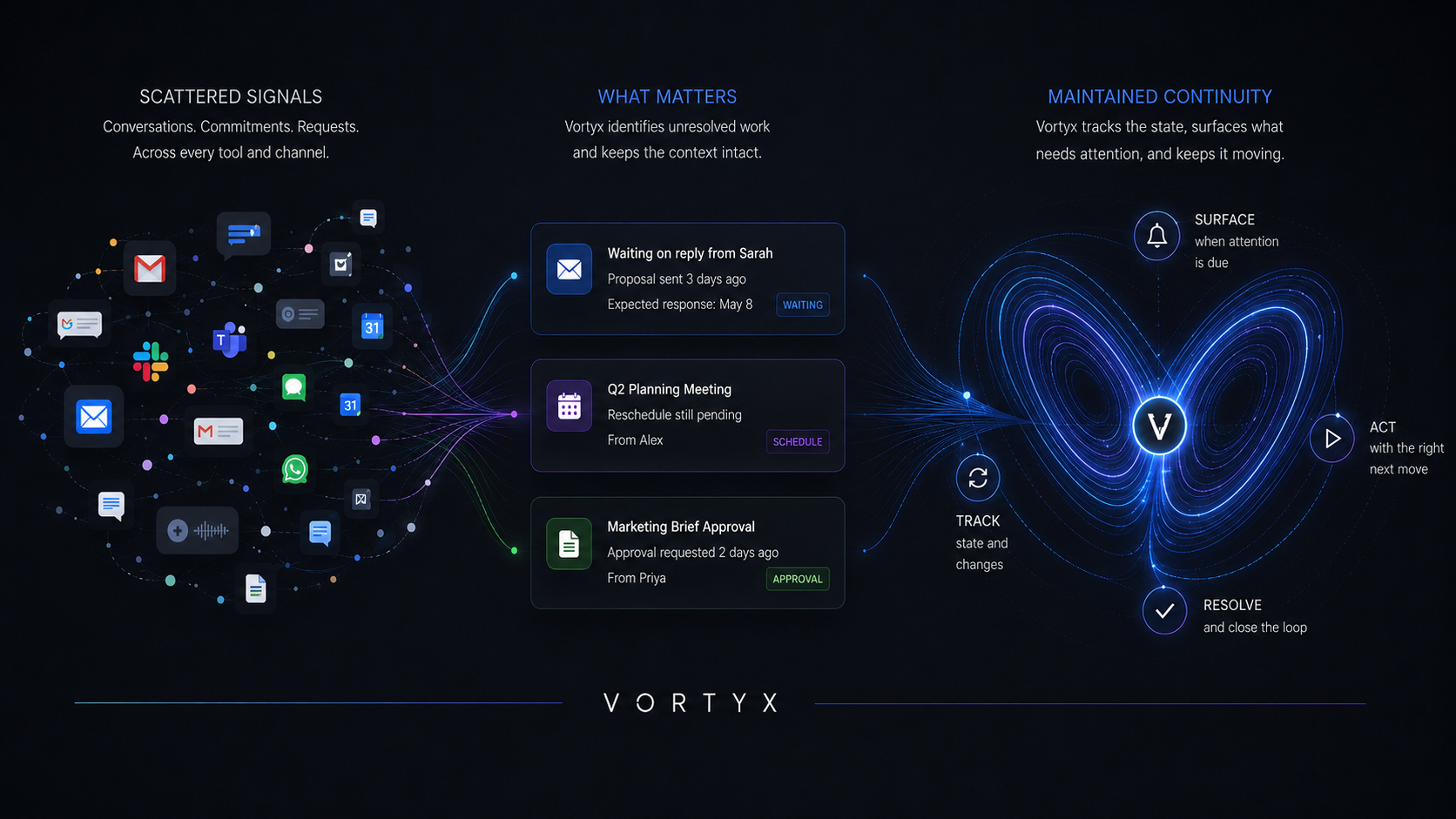
Your inbox knows what was said. Your calendar knows what is scheduled. Your task manager knows what you remembered to enter.
But none of them reliably keeps track of what remains unresolved between them.
Vortyx detects unfinished work, understands what state it is in, lets you review the next move, and keeps it visible until it is resolved.
What Vortyx keeps in view
Know what needs attention, what you're waiting on, and what happens next.
Vortyx turns scattered signals into a clear view of unresolved work without asking you to remember everything or maintain another list manually.
01
Needs your attention
See replies, decisions, commitments, renewals, and responsibilities that require action from you.
02
Waiting on others
Keep expected replies, approvals, documents, decisions, and payments visible until they arrive.
03
At risk of slipping
Surface overdue, stalled, time-sensitive, and recurring work before it quietly disappears from view.
04
Ready for the next move
Reply, follow up, schedule time, snooze, dismiss, or mark work handled with the relevant context still available.
Product walkthroughs
More Vortyx walkthroughs
From scattered emails, messages, notes, and commitments to reviewed follow-through.
Recover follow-ups hidden in email
See replies, commitments, and next steps that may otherwise disappear when the conversation closes.
Capture next steps naturally
Speak or type without structuring everything first; review the action before saving it.
Know what you're still waiting on
Keep expected replies, approvals, and decisions visible until they arrive or require a follow-up.
Intelligent resurfacing
Know why something needs attention now.
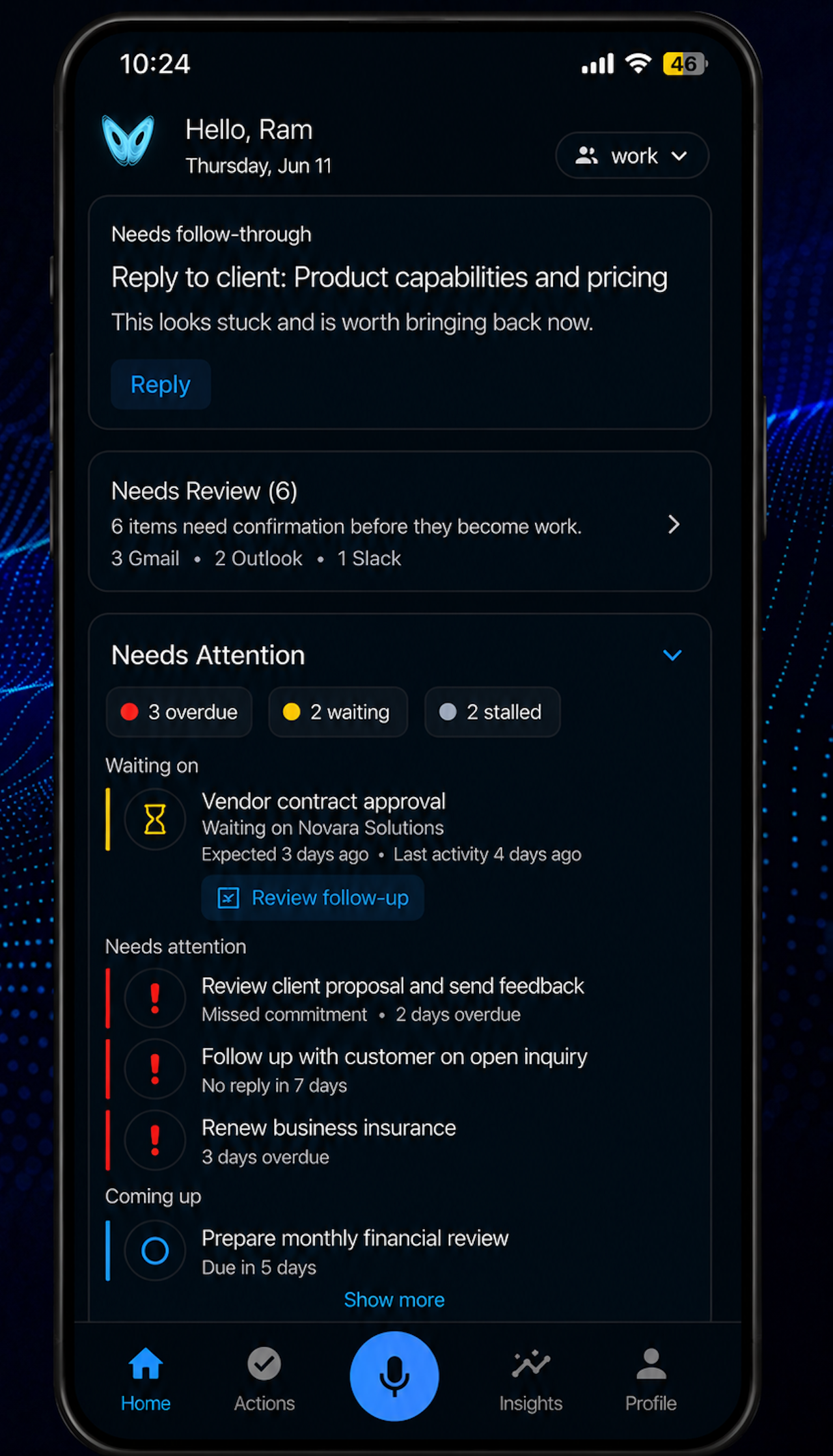
Vortyx does more than save an item and remind you later. It maintains the context and state of unfinished work as it moves between action, waiting, delay, and resolution.
Representative item
Vendor contract approval
Waiting on Novara Solutions. Expected 3 days ago. Last activity 4 days ago.
Status
Waiting on reply
Last activity
Last activity 4 days ago
Why now
Expected response has not arrived
Next move
Review follow-up
Vortyx keeps the relevant source, last meaningful activity, expected timing, and next move together so you can act without reconstructing the context.
Connected continuity
Vortyx keeps checking after you close the app.
Connect the sources you choose, and Vortyx can continue looking for unfinished work that may otherwise disappear inside everyday activity.
Replies you still owe
Identify messages that appear to require a response or next action from you.
Follow-ups from sent email
Keep track of messages you sent when a reply, approval, document, payment, or decision is still expected.
Work that has gone quiet
Bring back items when the expected response does not arrive, activity stops, or the next action becomes due.
Responsibilities that return
Resurface recurring commitments when the next cycle requires attention.
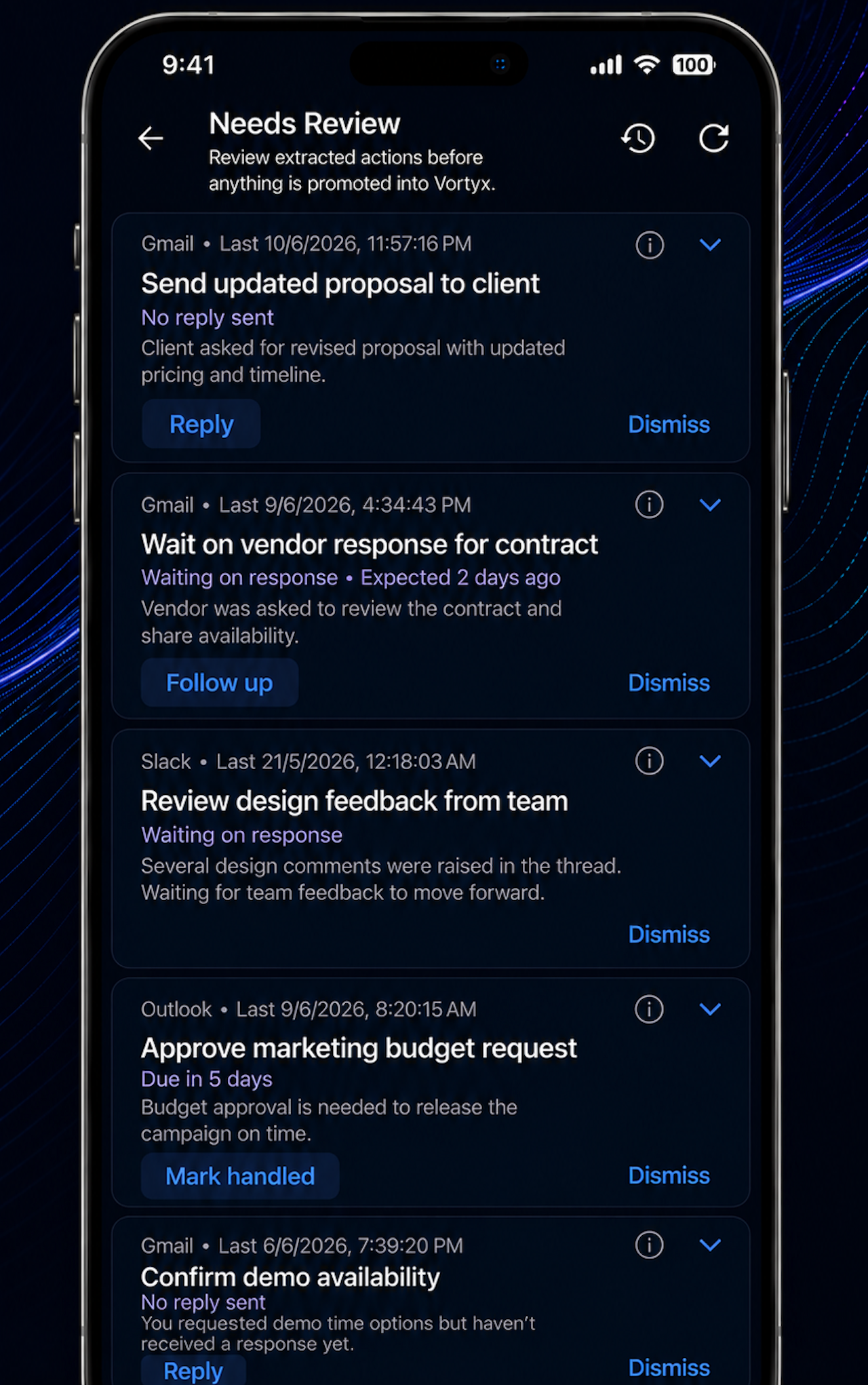
Connected checks surface possible open loops for review before they become tracked work.
From attention to action
Move the work forward without rebuilding the context.
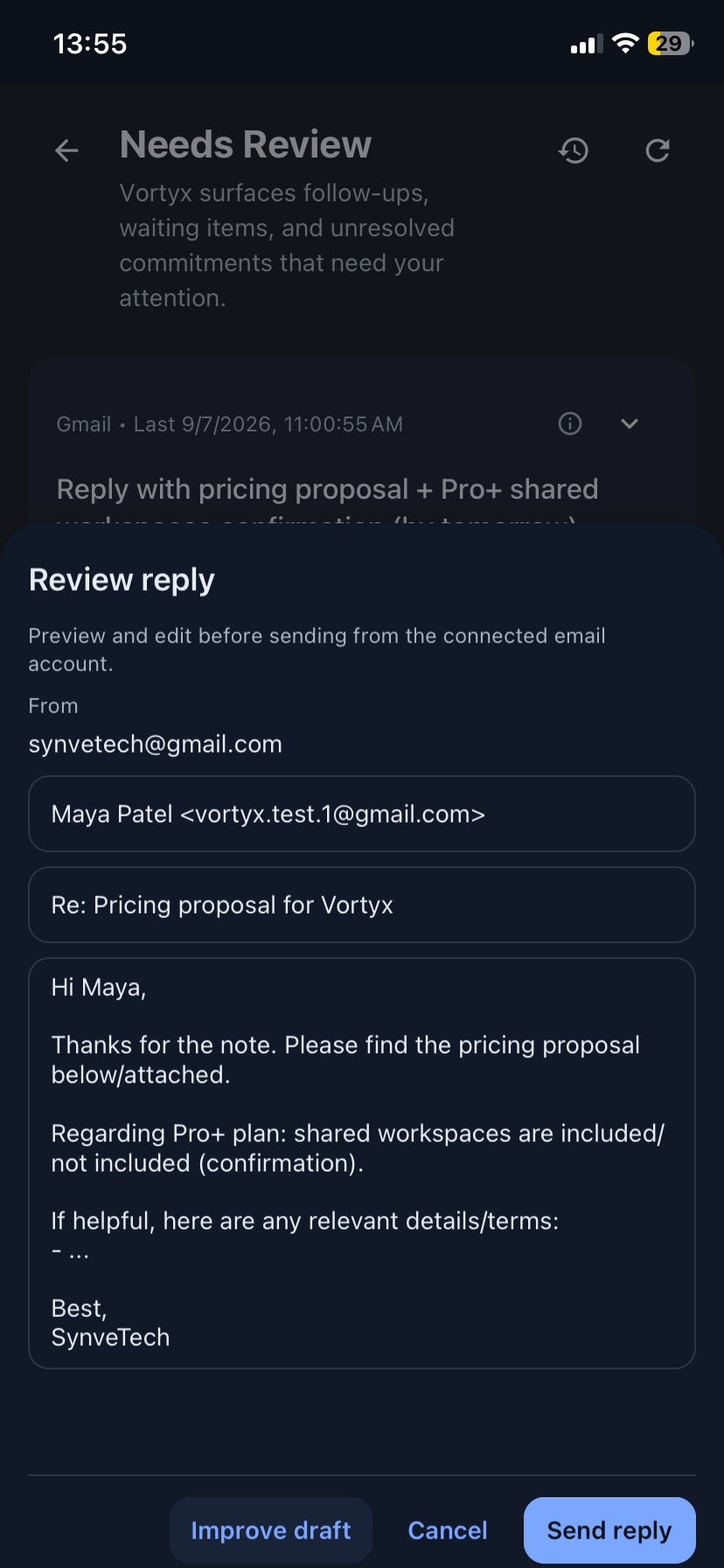
Once Vortyx surfaces unresolved work, you can choose the next move with the source context, timing, and suggested action still available, then improve drafts with natural-language guidance before sending.
Choose the next move
Reply, follow up, schedule time, snooze, dismiss, or mark the item handled.
Improve the draft
Start from a suggested reply or follow-up, then guide tone, detail, constraints, or missing facts in natural language.
Act or keep tracking
Send the message yourself, regenerate it again, find calendar time, check later, or keep the item visible until resolved.
Review-first sequence
End-to-end workflow
From missed reply to reviewed follow-up.
A single open loop can move from sent email to waiting state, resurfacing, and reviewed action without relying on memory.
01
Monday
You send the proposal
Pricing details are sent to a client, with feedback expected later in the week.
02
Thursday
No response arrives
The expected reply has not come in, so the thread remains unresolved.
03
Friday
Vortyx resurfaces it
The item appears in Needs Attention with source context, last activity, and why it needs attention now.
04
Your next move
Review the follow-up
Edit the suggested draft, send it yourself, snooze, or keep tracking until handled.
Also supports commitments from email, recurring responsibilities, and voice-captured actions.
How Vortyx is different
Built for the continuity gap between your tools.
Your inbox stores conversations. Your calendar stores scheduled time. Your task manager stores what you entered. Vortyx keeps track of what remains unresolved between them.
Tool
What it knows
Inbox
What was said
Calendar
What is scheduled
Task manager
What you manually entered
Vortyx
What remains unresolved and what needs attention next
Built for control
Vortyx is designed to increase awareness and assistance without taking important decisions away from you.
User-controlled access
Connections are optional, inbox checks are opt-in, and supported scopes can be configured per connected account.
Review before action
Suggestions stay separate until approved, drafts are editable before sending, and Vortyx does not send emails or messages automatically.
Disconnect or delete
Connected accounts can be disconnected, and users can delete their Vortyx account when it is no longer needed.
Verified for trusted access
Google OAuth verified, CASA Tier 2 validated, TAC ESOF Shield Certified, and Microsoft Entra publisher verified.
FAQ
What does Vortyx access?
Vortyx accesses only the accounts and sources you connect. Inbox checks are opt-in, and scope is controlled per connected account where supported.
Does Vortyx send emails or messages automatically?
No. Vortyx can suggest draft replies or follow-ups, but external actions require your review and approval.
Which email and collaboration services are supported?
Vortyx currently supports Gmail and Outlook email workflows, Slack capture, voice and text capture, and calendar-aware scheduling.
How is Vortyx different from a task manager?
Task managers track work you enter manually. Vortyx helps identify follow-ups, commitments, waiting items, and next steps from the places work already happens, then lets you review what should be tracked.
Can I use Vortyx without connecting email?
Yes. You can use voice and text capture for commitments, reminders, recurring responsibilities, and next steps without connecting an email account.
Keep unfinished work visible until it is resolved.
Bring follow-ups, commitments, waiting items, and recurring responsibilities into one review-first continuity workflow.